Warning: include_once(/home/hiroooaki/nabelog.org/public_html/wp-content/plugins/wp-file-manager/file_folder_manager.php): failed to open stream: Permission denied in /home/hiroooaki/nabelog.org/public_html/wp-settings.php on line 391

Warning: include_once(): Failed opening '/home/hiroooaki/nabelog.org/public_html/wp-content/plugins/wp-file-manager/file_folder_manager.php' for inclusion (include_path='.:/opt/php-7.3.33-3/data/pear') in /home/hiroooaki/nabelog.org/public_html/wp-settings.php on line 391
DaVinciResolve 書き出しエラー | nabelog

【DaVinciResolve】書き出しエラー

DaVinciResolve

DaVinciResolveで書き出ししている際にエラーが発生したので解決方法を共有させていただきます。

スポンサーリンク

エラー内容

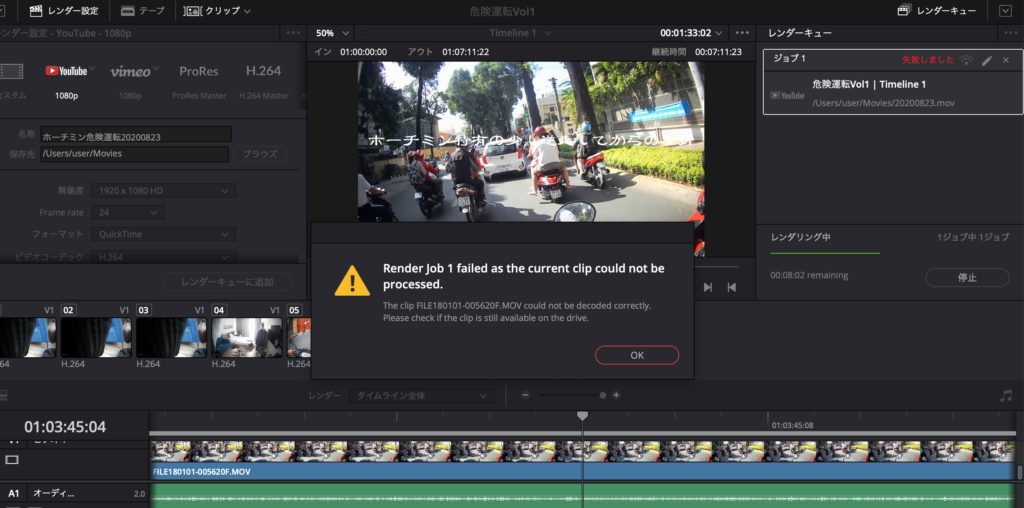
エラーの内容は「render job 1 failed as the current clip could not be processed」となっており、詳細は「The clip —.MOV could not be decoded correctly.
Please check if the clip is still available on the drive.」となっております。

設定変更

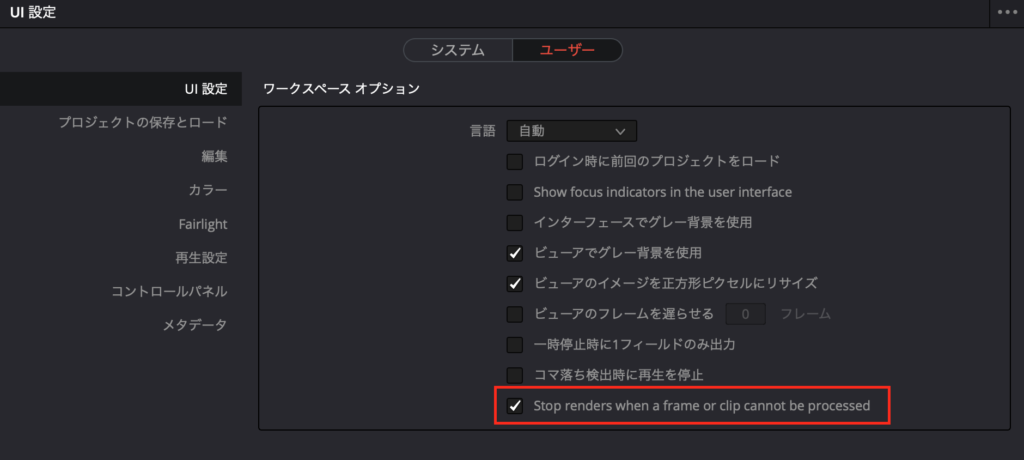
環境設定を開き、ユーザー>UI設定の「Stop renders when a frame or clip cannot be processed」のチェックを外してください。
コメント

タイトルとURLをコピーしました